
Introduction:
When people visit a website, getting them to stay on the page is only the first step. The real goal is to encourage them to take meaningful action, such as contacting your business, requesting a quote, purchasing a product, booking a consultation, or signing up for a service. This is where a Call-to-Action (CTA) becomes important.
A CTA tells website visitors what they should do next. It can be a button, text link, banner, or short message designed to encourage a specific action. Examples include “Get Started,” “Contact Us,” “Buy Now,” “Request a Quote,” and “Book a Free Consultation.”
A well-planned CTA can improve user experience, generate more leads, and increase conversions. In this article, we will explain what is a Call-to-Action (CTA), why CTAs are important, different types of CTAs, and how effective CTAs can increase website conversions.
What Is a Call-to-Action (CTA)?
A call-to-action (CTA) is a visual element or message that persuades a visitor of an online resource to perform something.
Almost anything that advances a business goal can be the activity. For instance, “Shop Now” can be used by an online retailer, whereas “Get a Free Consultation” may be used by a digital marketing agency.
Instead of leaving visitors unsure of what to do after reading a page, a call to action (CTA) provides a clear next step.
For example:
Without a CTA:
“We provide professional digital marketing services for growing businesses.”
With a CTA:
“We provide professional digital marketing services for growing businesses. Get a Free Consultation →”
The second example provides visitors with a clear action they can take.
CTAs can appear as:
- Buttons
- Text links
- Images or banners
- Pop-ups
- Forms
- Website sections
- Blog post links
- Social media posts
- Landing pages
The best CTA depends on the page, audience, and business objective.
Why Is a CTA Important for a Website?
Even if a website has great content, a visually appealing layout, and helpful information, users may still leave without doing nothing.
The lack of clear guidance on the website is one of the reasons.
A CTA solves this problem by directing visitors toward the next step.
For businesses, CTAs can help:
- Generate leads
- Increase sales
- Get more inquiries
- Encourage bookings
- Increase newsletter subscriptions
- Promote products and services
- Improve user engagement
- Guide visitors through the customer journey
For example, imagine someone visits a web design service page. They read about website development, pricing, and benefits. If there is no clear CTA, they may simply close the page.
But a button such as “Start Your Website Project” gives them an easy way to continue.
This makes the CTA an important part of both website design and conversion optimization.
How Does a CTA Increase Conversions?
The main purpose of a CTA is to encourage users to take action. But how exactly does it help increase conversions?
1. It Gives Visitors Clear Direction
One of the biggest benefits of a CTA is that it removes confusion.
Visitors should understand what they can do next. A clear CTA provides that direction.
For example:
“Learn More About Our Services”
is more useful than simply ending a page after the service description.
When visitors know what to do next, they are more likely to continue interacting with the website.
2. It Makes the Next Step Simple
People are more likely to complete an action when the process is easy.
Imagine a visitor wants to contact a business. If they have to search through several pages to find the contact form, they may leave.
A visible “Contact Us” or “Get a Free Quote” button can take them directly to the next step.
Reducing unnecessary steps can create a smoother user experience and support better conversion rates.
3. It Encourages Immediate Action
Effective CTA wording can encourage visitors to take action instead of delaying the decision.
Words such as:
- Get
- Start
- Book
- Download
- Discover
- Request
- Shop
- Subscribe
can make a CTA more action-oriented.
For example:
“Get Your Free Quote”
clearly communicates an action and a potential benefit.
4. It Highlights the Value of Taking Action
A CTA can communicate what the visitor will receive after clicking.
Compare these two examples:
Submit
Get My Free Consultation
The second CTA gives users more information about the benefit.
Value-focused CTA text can make the action feel more useful and relevant.
5. It Guides Visitors Through the Customer Journey
Not every website visitor is ready to buy immediately.
Some visitors are discovering your business for the first time. Others may be comparing options, while some may already be ready to purchase.
CTAs can support visitors at different stages.
Awareness:
“Learn More”
Consideration:
“Explore Our Services”
Decision:
“Request a Free Quote”
Purchase:
“Buy Now”
Using the right CTA at the right stage can create a more natural customer journey.
Different Types of CTAs:
There is no single type of CTA that works for every website. Businesses can use different CTAs based on their goals.
Lead Generation CTA
Lead generation CTAs encourage visitors to provide their contact information.
Examples:
- Get a Free Quote
- Request a Consultation
- Contact Our Team
- Book a Free Call
These are especially useful for service-based businesses.
Sales CTA
Sales CTAs encourage visitors to purchase a product or service.
Examples:
- Buy Now
- Shop Now
- Order Today
- Get Started
These CTAs are commonly used on e-commerce websites and service pages.
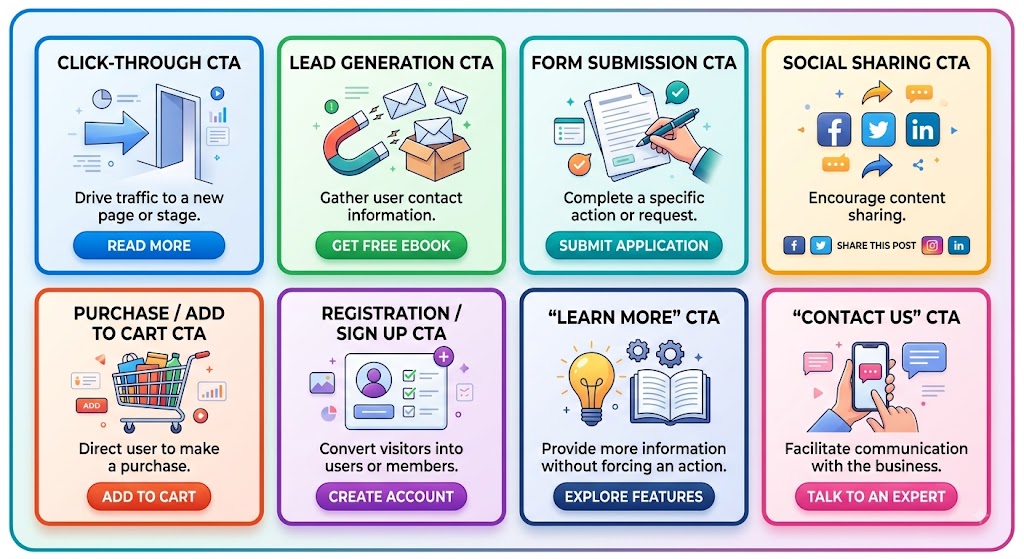
Download CTA
A download CTA encourages users to access a resource.
Examples:
- Download the Guide
- Download Now
- Get the Free Ebook
- Download the Checklist
This type of CTA can also be useful for lead generation.
Sign-Up CTA
Sign-up CTAs encourage visitors to create an account or subscribe.
Examples:
- Sign Up
- Create an Account
- Start Your Free Trial
- Subscribe Now
These are common for software platforms, newsletters, and online services.
Content CTA
Blogs can also use CTAs to guide readers toward additional content.
Examples:
- Read More
- Explore Our Services
- Learn More
- Discover More Tips
For example, a digital marketing blog can guide readers from an educational article to a relevant service page.
What Makes a CTA Effective?
Creating a CTA is easy. Creating an effective CTA requires more consideration.
Use Clear and Simple Language:
Your visitors should understand the CTA immediately.
Instead of:
“Proceed”
consider:
“Get a Free Consultation”
Clear language tells visitors exactly what will happen next.
Use Action-Oriented Words:
Strong CTAs generally encourage an action.
Words such as Get, Start, Book, Download, Discover, Request, Shop, and Subscribe can make CTA messages more direct.
Communicate a Benefit:
Whenever possible, explain what the user gets by taking action.
For example:
“Download Our Free SEO Guide”
is more informative than:
“Download.”
The first CTA communicates both the action and the benefit.
Make the CTA Visually Noticeable:
A CTA should stand out from the surrounding content.
Button size, spacing, typography, and contrast can help visitors identify the CTA quickly.
However, the CTA should still match the overall website design. A button that looks completely disconnected from the page can reduce trust.
Place CTAs Strategically:
CTA placement matters.
Depending on the page, CTAs can be placed:
- Near the top of the page
- After introducing a service
- After explaining benefits
- Near pricing information
- After product details
- At the end of a blog post
- Inside relevant sections
The goal is to show the CTA when the visitor has enough information and is ready for the next step.
CTA Examples for Different Businesses
Different businesses need different calls-to-action.
1.Digital Marketing Agency
=> Get a Free Digital Marketing Consultation.
2.Web Design Company
=> Start Your Website Project.
3.E-commerce Business
=> Shop Our Collection.
4.Local Service Business
=> Request a Free Quote.
5.Restaurant
=> Book Your Table.
6.Online Course
=> Enroll Now.
7.SaaS Business
=> Start Your Free Trial.
8.Blog or Content Website
=> Subscribe for More Tips.
The CTA should match the action that is most valuable for both the visitor and the business.
Common CTA Mistakes to Avoid:-
Even a CTA can perform poorly when it is used incorrectly.
Using Too Many CTAs
Adding too many competing buttons can confuse visitors.
If every section has a different primary CTA, users may not know which action is most important.
Keep the primary goal clear.
Using Generic CTA Text
“Click Here” does not tell visitors what they will get.
Instead, use descriptive text such as:
“Download the Free Guide”
or
“Get a Free Quote.”
Making CTAs Difficult to Find
If an important CTA blends into the page, visitors may overlook it.
Make sure important CTAs have enough visual contrast and surrounding space.
Ignoring Mobile Users
Many people browse websites from smartphones.
A CTA should be easy to see and tap on mobile devices. Buttons should have sufficient size and spacing so users can interact with them comfortably.
Making False or Unclear Promises
Your CTA should accurately represent what happens after clicking.
For example, do not promise a “Free Consultation” if the user will immediately be asked for payment.
Clear and honest CTAs help build trust.
Not Testing Different CTAs
There is no universal CTA that works for every audience.
Different wording, placement, design, and offers can produce different results.
Testing can help you identify which CTA generates better results.
How to Improve Your CTA Conversion Rate
If your current CTA is not generating enough conversions, start by analyzing its performance.
You can test different elements such as:
CTA Text:
“Contact Us” vs. “Get a Free Consultation”
Offer:
“Learn More” vs. “Get a Free Quote”
Placement:
Top of the page vs. after the service explanation
Design:
Different button sizes, typography, or visual treatments
Supporting Content:
Adding a short benefit statement near the CTA
For example, a service page could test:
Version A:
Contact Us
Version B:
Get Your Free Consultation
If Version B generates more qualified inquiries, the data can help guide future website improvements.
How CTAs Work With SEO and Content Marketing?
CTAs are not only useful on sales pages. They can also support your content marketing strategy.
Suppose a user finds your blog through Google after searching for information about SEO.
The user reads the article and learns about search engine optimization.
At the end of the article, you can provide a relevant CTA such as:
“Need Help Improving Your Website SEO? Get a Free Consultation.”
This creates a natural connection between educational content and your service.
Internal CTAs can also guide visitors toward relevant pages, helping them discover more useful information about your business.
Final Thoughts:-
A clear Call-to-Action (CTA) helps guide visitors toward the right action. Whether it is “Get Started,” “Contact Us,” or “Buy Now,” an effective CTA can improve engagement, generate leads, and increase conversions. Focus on clear wording, strong visibility, and the right placement to get better results.